Key Search
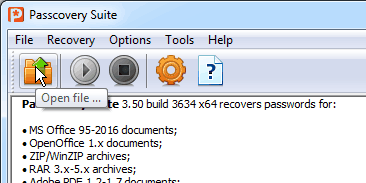
1. Îòêðîéòå çàùèùåííûé ïàðîëåì äîêóìåíò ñ 40-êà áèòíûì êëþ÷îì øèôðîâàíèÿ (Microsoft Excel 97-2003 èëè Microsoft Word 97-2003). Use the Open file toolbar button, the menu (File -> Open), or the hot key (Ctrl+O).
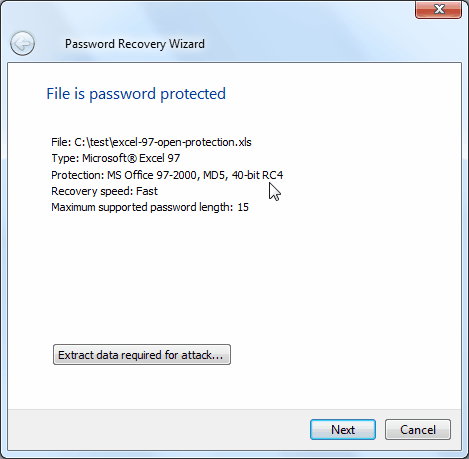
2. Read the information about the document displayed in the Information window. Adjust the search settings (button "Next").
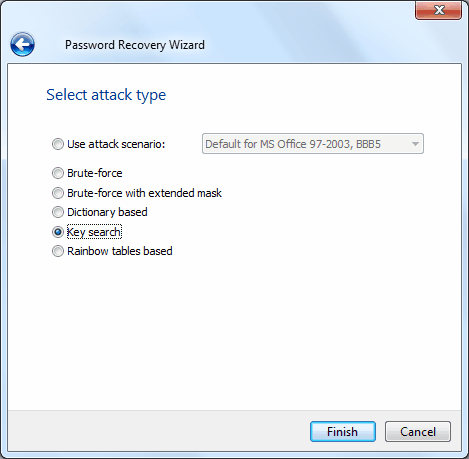
3. Âûáåðèòå îïöèþ ïîèñêà êëþ÷à øèôðîâàíèÿ è íàæìèòå êíîïêó "Finish", ÷òîáû íà÷àòü ïîèñê.
The search status will be displayed in the status pane throughout the search.
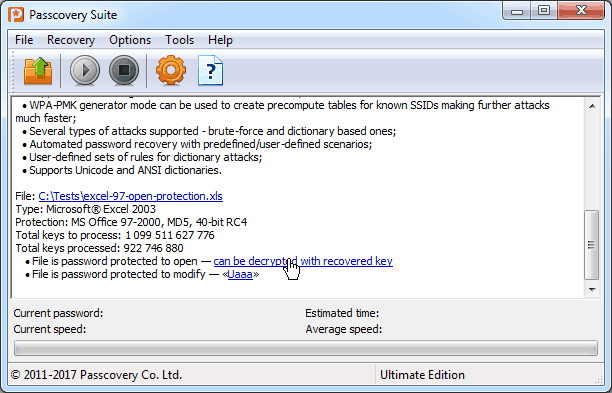
4. Êîãäà êëþ÷ øèôðîâàíèÿ áóäåò íàéäåí, ïðîãðàììà ñîîáùèò îá ýòîì è ïðåäëîæèò óêàçàòü ìåñòî è çàäàòü èìÿ äëÿ ñîõðàíåíèÿ ðàñøèôðîâàííîãî ôàéëà. Ñîõðàíèòå åãî íà äèñêå è îòêðîéòå â ïàêåòå Microsoft Office.